Original creations in Second Life by Oggy Fink.

Showing posts with label Script. Show all posts

Saturday, January 3, 2026

OSI Vendor 1.0

Today we released a new item in our Marketplace store : the OSI Vendor version 1.0.


As the name suggest it is (yet another) vendor script. The efforts were set on reliability, safety and features while remaining simple and straightforward.

All settings go into one solid notecard with a clear syntax and helpful comments. You define what to sell, for how much money, with whom you want to share profit with and how much etc. When processing the notecard, the script will check to see if everything is coherent. For example you cannot have a sum of profit shares that goes over 100% ! Or it checks the inventory permissions are good. All details are explained in the documentation.

The sale will actually begin once all checks give satisfactory results. Any problem and the script will warn you with a clear message so you an correct the issue.

The sale does not rely on an external web server, and no usage fee is applied. Buy once, use as much as you want!

You can use the OSI Vendor script to sell single items or multiple items at the same time (sent as a folder to the buyer's inventory). All messages (for buyer, owner and partners) are customizable too (maybe to translate them in another language), all inside the same notecard.

Permission details:

  • the script is copyable only
  • you can use the script in any prim. One suitable prim (full perm) is provided, but you will probably want to retexture it to show your product.

As usual, support inquiries, feature requests, constructive criticism are welcome. Email is preferred!

Saturday, August 26, 2023

Wearpose System version 3.0

Today we are (finally) releasing version 3.0 of the WearPose System.


The WearPose System is a scripted system designed for the creation of attachments that can animate their wearer, with the help of a complete menu system inspired by AvSitter. While doing so it also takes care of the position of the attachment with respect to the avatar and also features an adjustment system to shift or rotate the avatar itself with the help of extra "adjustment poses".

All details are available on our dedicated website: https://sites.google.com/view/wearpose

Below is a list of highlights for this new version 3.0, which is a major rewrite, adding some features and correcting some problems:

  • Major rewrite with LinksetData (LSD) in mind to conserve script memory
  • The main scripts now make sure they have the same version number
  • Renamed the ".config" notecard to ".menus" to more accurately reflect its contents and avoid conflicts with other scripts
  • A POSE definition can now have - (a single dash) as the name of an animation file, to mean "no animation" but still allowing adjustment
  • Reworked the preparation menu structure to allow more operations, and support copying positions from one pose to another, list existing positions and purge unused positions. This also allows to effectively rename a pose: just rename the pose in the .menus notecard and copy the positional information from the older name thanks to the new preparation menu option, then regenerate the .positions notecard.
  • Increased the timeout of the preparation menu from 30 seconds to 5 minutes.
  • Under-the-hood : positional information is no longer attached to the animation file but to the pose button itself.
  • Added 2 new options in the .menus notecard: TIMEOUT and TIMEOUTMSG, to allow customization of the timeout delay and message in production phase.
  • Where relevant, \n (messages and prompts) is replaced by a newline.
  • Menus can now have a specific prompt thanks to an enhancement of the MENU directive. The prompt set by the TEXT keyword acts as a default value.
  • (even) better detection of errors in the configuration notecard.
  • The Main menu can now be customized (renamed and/or given a specific prompt) if the MENU keyword happens before any button-creating directive. Care is taken to rename the corresponding navigational (TOMENU) button accordingly.
  • "Close menu" and "About..." predefined buttons are now available for use in RECALL, NAV or NAVMAIN directives.
  • Added a reset command (API and dedicated script).
  • The scripts make sure all buttons have non-empty labels.
Configuration notecards established for previous versions will remain compatible with version 3.0, you will just have to rename the ".config" notecard to ".menus".

Buyers of previous versions should automatically get an update from the SL MarketPlace, and can always trigger a redelivery from the MP.

A free demo object is also available, just click here.

Saturday, November 5, 2022

AutoAttach v1.3

Today I released a new version of the AutoAttach script that addresses one minor problem in the master script related to the possibility to "ignore" a menu in SecondLife. Now you get the possibility to reopen the ignored menu by clicking the master object.

This release also adds two configuration options (MENU_TIMEOUT and MENU_REOPENONTOUCH) and documents another (REZ_TIMEOUT).

The slave scripts were also adjusted with an option to make them detach when the owner touches them. This is mostly useful in a "coffee-machine" type scenario (with options AUTODETACH=no and STOPON=none).

Buyers of previous versions should automatically receive the update from the SL Marketplace platform.

Any question or feature request? Feel free to contact me!


Thursday, June 16, 2022

Update: MvtPlayer v2.2

Today we released an update to our MvtPlayer scripted system, which has now reached version 2.2.


This new releases focuses on enhancing compatibility (I should say "tolerance") with foreign scripts that pause a keyframed motion independently of MvtPlayer. In that case the MvtPlayer will now detect it and wait for the motion to resume before processing the rest of the motion sequence.

This was primarily intended to enhance compatibility with AVSitter, because as a new pose or animation is played by AVsitter, it needs to use a direct positionning function (probably related to adjustment). For this to work the keyframed motion must be temporarily stopped. Version 2.2 should accommodate for this in most situations (as it is kind of a tolerance, it cannot be perfect).

Users who bought MvtPlayer from our Marketplace store will automatically get the update from LL. Buyers from our inworld store will get the update directly from me.

Please visit our dedicated website for all details regarding MvtPlayer, and do not hesitate to contact me for any question, problem, constructive criticism...

Saturday, June 4, 2022

O-Radar v1.0

Today we released a new product: the O-Radar.

As the name suggests, this is a gadget that will help you detect people arriving. It differs from classic radars in a few key points:

  • no range limitation: it detects avatars over the whole parcel
  • 2 possible setups:
    • Standalone HUD: designed for individuals, just wear it and you're done!
    • Rezzed detector and transferable Remote HUD: designed for clubs and venues to let the staff know when a new visitor has arrived.
  • special care for people who are back after some time (1 hour by default). They are mentioned in a specific message.
  • Messages include a link to open the person's profile in the viewer, but the messages can be changed in the configuration notecard.
In the second setup (rezzed detector + remote HUD), a single detector is to be used over the whole parcel and communicates with all remote HUDs. This ensures minimal lag in this situation while allowing many people to be informed at the same time.

A few configuration options are available:
  • Message format: you can completely rewrite the message said when someone enters the area, or is back
  • Scan rate: by default a scan is performed every 5 seconds but you can change this value
  • Remember time limit : set for how long information about people who left is kept. When this time is elapsed, they will be considered new again.
Of course default settings are very reasonable and you can just choose to use them without any modification.

Ease of use, low lag and reliability where the top priorities when developing this product. It's now available at OSI marketplace and inworld stores.

Wednesday, January 5, 2022

Update: MvtPlayer 2.1

Today we released a new version of our MvtPlayer system to version 2.1.


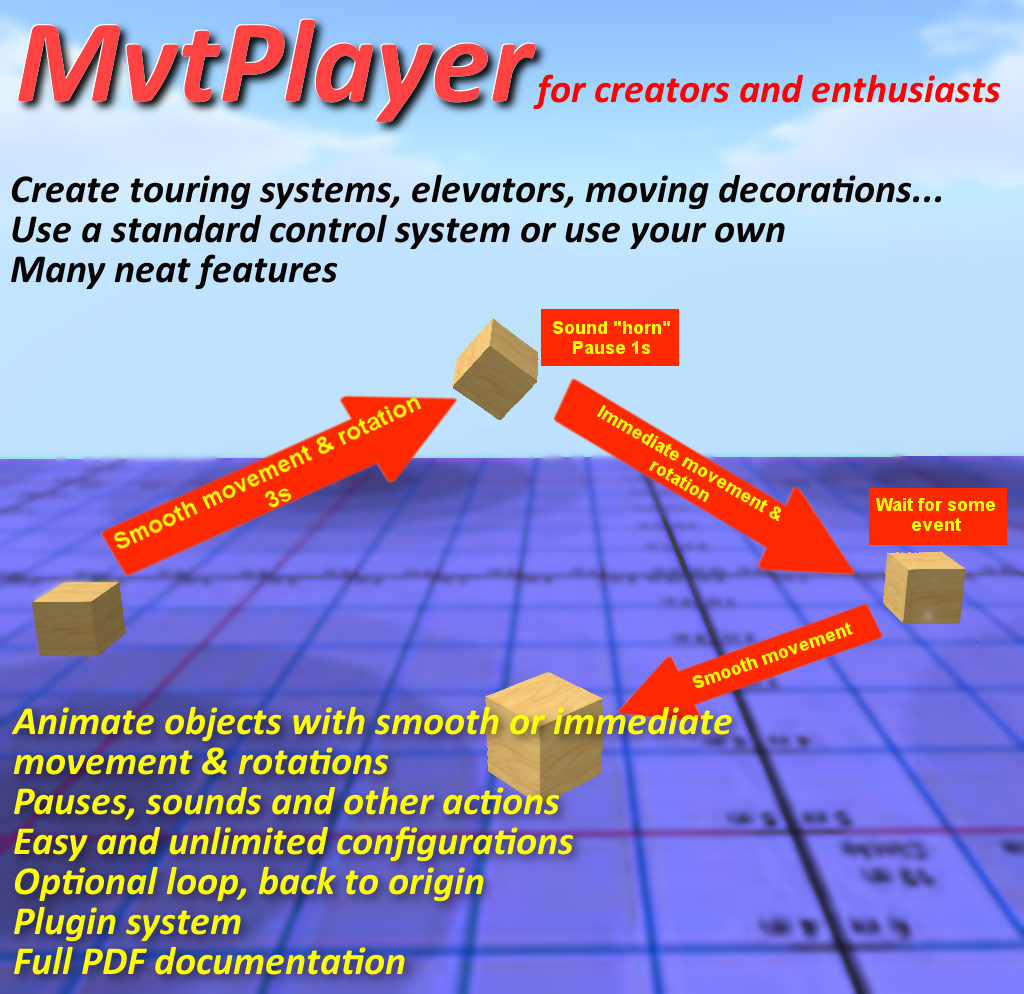
This is a scripted system useful for creators and enthusiasts that enables them to define sequences of actions containing:

  • Smooth movement (keyframed motion)
  • immediate movement
  • pauses
  • sound effects
  • other types of actions supported by other (plugin) scripts.
This update adds Playback options (to alter the scale and speed of the sequence or even reverse it, and change the sound volume), enhances compatibility with avSitter, and focuses on peripheral scripts (controllers and plugins) to enhance immediate usability:
  • MVTP_GeneralController : manages a complete menu system and/or remote control (direct or through another object)
  • remote control scripts (usable with MVTP_GeneralController): MVTPRemote_Trivial (used as an example), MVTRemote_Buttons (useful to create a HUD or a remote control with buttons), MVTRemote_Detection (used to start a sequence when someone is detected with a sensor or by a collision)
  • Two interface scripts : MVTP_to_avSitter_StartOnSit (start a sequence when someone sits), MVTP_to_avSitter_MvtControl (complete menu system integrating with avSitter's menu with lots of features)
  • Plugin scripts: MVTPlugin_RotatePrim (smoothly rotate a prim when a plugin wait step activates), MVTPlugin_ChatListen (support actions like emitting chat, starting animesh animations, applying Theme-O-Matic themes, unsitting an avatar (great to create a transportation system).
Some examples of preconfigured objects are also included in the package.

The MvtPlayer website was updated and contains all details. The MvtPlayer is available at Oggy's Scripted Items marketplace store and in-world store.

This update also starts bringing a new visual identity to our brand, with a whole new logo and color chart. These were created by Reda from NoSoBad. Check out their great work and products! The new visual identity for OSI will be progressively brought to other products and platforms in the near future.

Saturday, November 13, 2021

AutoAttach 1.1

Today I fixed a minor bug in the "slave" script (both the regular and experience versions) of the AutoAttach system, that prevented the attachments to automatically detach when the user teleports to another sim and the AUTODETACH=no option was used in the configuration.

An automatic redelivery is already scheduled for buyers of version 1.0, with instructions on how to update their existing objects.

The AutoAttach system is available at Oggy's Scripted Items marketplace store and in-world store. Read about it in the original article.

Saturday, August 28, 2021

AutoAttach v1.0

Today at Oggy's Scripted Items we released AutoAttach, a new script system designed to manage objects that rez and attach to an avatar, possibly with a choice from the user thanks to some menus, and with a number of useful options to fine tune the behavior.


What for?

Below are a few usage scenarios for this package, but of course they are just suggestions and I'd be happy to hear about the usage you are making of the AutoAttach system!

Quick set up for a live performance

The initial request for this system came from a musician friend who does live performances in SL and needed a quick and reliable way of getting prepared for the show by attaching a guitar (with a choice), mediator and other accessories when "sitting" at the microphone.

Demonstrator for a shop owner

No need to package a specific "demo" version of your mesh clothes or accessories that will clutter the customer's inventory. With AutoAttach the customer can be prompted for one or several objects - clothes, jewelry, shoes... It does not matter if it's mesh, rigged mesh or ordinary prims!

When they confirm the permission they get to try the real thing without actually getting it. And with the "experience" version of the attachment script, they need confirm the permissions only once! (read about experiences in Second Life® here).

Custom HUD to organize your outfit elements

Sometimes you would like a quick way of selecting outfit elements (accessories, jewelry, whatever) to wear without having to search your inventory or navigate an overcrowded "outfits" menu in your viewer.

With the AutoAttach system, as long as your accessories are modifiable and copiable, you can just put them in the inventory of a button on your favourite HUD, maybe custom-made, put in the AutoAttach scripts, adjust the configuration and you're all set!

Feature list

Configuration

The AutoAttach system was designed to be very versatile to allow a variety of use cases. Thanks to a comprehensive solid configuration, you can define:

  • the list of objects to attach, which require a choice through a menu and which don't ;
  • who is allowed to use: owner only, group members or everyone ;
  • the condition that triggers the attachments: an allowed user touching the prim, sitting on it, the prim being rezzed on the ground, or attached to its owner, or maybe a combination of these conditions ;
  • optionally the condition that cases the attachments to detach : touching the prim, standing from it, the prim being rezzed again or detached from its owner, or just no condition at all !
  • whether the attachments will detach when this condition is met, or just remain attached until the user manually detaches them or maybe teleports to another sim ;
  • if there will be a "stop timer" that makes the attachments detach after a given period of time ;
  • menu customization : define the prompt and rename the "Cancel" button if you need to ;
  • customize messages said in the chat, or just disable them

Attachment script(s)

You can also fine tune the behavior of attachments by customizing the full perm script that goes into them. A few parameters exist in there:
  • messages that you can alter or just disable
  • forcing a different attachment point
  • whether to detach when the user teleports to another sim or not
The attachment script comes in two versions: a regular one and an "experience" one, as described above. Experiences enables to only ask permissions once and for all, but require that you have access to an experience with the "contributor" (or owner) role. You can read about experiences in Second Life here.

And of course, since the attachment scripts are full perm, you can just modify them if you have the required scripting knowledge. Information about this is given in the documentation.

Plugins

The AutoAttach scripts send messages to other scripts so that they can interface and do something useful at this point (play sound? display a specific texture? prompt the user with something else?).

An example plugin script is provided, that displays hovertext (like "This demonstrator is in use by [avatar]") with a number of nice easy-to-use features (to set color, alpha, fade in & out times, automatic erasing after some time). The display of this hovertext itself is managed by my HoverTextMgr script, freely available in my MarketPlace store.

Do you need something specific ? More features available to plugins? Feel free to contact me!

Full documentation

A full documentation notecard, suitable for new users and beginners as well as advanced users and scripters, is provided:
  • usage scenarios
  • step by step setup
  • configuration reference
  • configuration examples
  • permissions considerations
  • details about the attachment script versions
  • scripting information to create plugins
Do you need something more? Just contact me!

Friday, August 14, 2020

Stream switcher 2.1

Today I released in my Marketplace store an improved version of a script I wrote long ago for my own usage, as I realized it could be useful to others, called Stream Switcher.

As the title suggests, its job is to enable the user to select a "station" from the menu and set it as the land music stream.

The stations themselves are defined as a name and address in a simple straightforward notecard called ".stations".

Another notecard called ".options" contains, well, options for you to set the access rights and fine-tune the hover text displayed when a station is selected. This is shown on the picture below.

The resulting menu is automatically formatted into pages of 9 buttons as shown on the next screen capture. Click on a button to activate the corresponding station, it could not be easier!

As always, suggestions and requests are always considered and constructive criticism is welcome. Do not hesitate to contact me!

Monday, July 6, 2020

Theme-O-Matic v2.2

Today I am happy to announce the release of the latest version of our Theme-O-Matic, version 2.2.

For the record, this is a powerful theme system designed for creators in Second Life® so that they can record appearance sets (called "themes") into notecards. Later they can activate them (or have their customers activate them) from any "client" script (several are provided) or compatible system like AVSitter. Please see the dedicated website for more information. And don't forget the video tutorials available there!

Theme-O-Matic cover 2.2

Here is a summary of changes from the previous version 2.1:
  • Bug fixes, in particular one nasty bug in the preloader script
  • New "Theme toolbox" that enables special operations with themes and the T-O-M itself. This new subsystem will in particular help you update your themes in case you added or removed prims from your object (this is known as "remapping").
  • New API message sent when a theme is encoded with an unknown or unsupported version of the Theme-o-matic - just preparing the future :)
  • Enhanced support and client scripts (most notably the Remote Control script supports explicit preloading at the start - still full perm)
  • Minor adjustments here and there
  • Updated the website
  • New cover picture, new demo object to be released soon!
Buyers of previous versions will soon receive the new update.

The Theme-O-Matic is now available at Oggy's Scripted Items marketplace store.

Friday, May 22, 2020

Second tutorial video for the Theme-O-Matic

After the first tutorial video that focused on Theme creation with the Theme-O-Matic, I added today a new video aiming at using themes with the help of a few standard clients shipping with it, and also explaining the concept and operation of preloaders:
All information is readily available on the Theme-O-Matic website too.

Again sorry for the thick French accent, do not hesitate to activate subtitles (both English and French subtitles available).


I hope you enjoy this video, and please share, leave comments, any constructive criticism is welcome. And of course, do not hesitate to contact me for any question or inquiry.

Wednesday, March 11, 2020

Multi crossfade

Long ago (damn, already 7 years!) I made a free fullperm script that would enable two prims to "cross fade", one fading in while the other fades out, in a repeated manner.

Recently someone asked for a special version of this script that would allow the same but for more prims. So here it is, the "Multi crossfade" allows the crossfading of any number of prims.

Still free and full perm, comments are inside the script about the available parameters: prim numbers, face number, sustain time, numer of fading steps and fading duration. A demo object is included in the package.

Now available at Oggy's Scripted Items marketplace store, free for commercial and commercial purposes but please no resell as is. Of course due credit and donations always appreciated.

Thursday, January 30, 2020

First tutorial video for the Theme-O-Matic

Today I finally published a first tutorial video for the Theme-O-Matic, focussing on theme creation on a simple practical example:
  • preparation scripts,
  • properties selection,
  • configuring filters,
  • creating notecard themes,
  • testing the themes.
If you somehow have difficulties understanding my thick french accent, please activate the subtitles! French translation of these subtitles is on its way too!


In an upcoming tutorial video I'll expose how themes can be used in a real production environment.

I hope you enjoy this video, and please share, leave comments, any constructive criticism is welcome. And of course, do not hesitate to contact me for any question or inquiry.

Sunday, May 12, 2019

Theme-O-Matic v2.1

I am pleased to announce that a new revision of the Theme-O-Matic was just released today, along with a brand new dedicated website.


This powerful theme system allows Second Life™ creators to define themes (sets of parameters for their objects and prims) that can be applied by their end users or another script: menus, touching, from AVSitter™ or another product, when a specific event happens. Thanks to the preloaders introduced in version 2.0 applying a theme can be almost instantaneous where other products would take a very long time for complex themes.

This new version can be considered as a minor revision but one important bug was fixed (and others less important) where the preloaders could report a valid theme as corrupted in rare situations. Themes created with older versions remain entirely compatible though.

Here is the list of changes introduced in version 2.1.

  • Bug fixes and optimizations;
  • new utilities menu to allow setting of properties not available from the viewer's interface: hover text and omega (for any prim, not only for the whole object);
  • "Test theme" in the preparation menu no longer caches the notecard names at startup. This enables to avoid a stack/heap collision error in case of a very large number of notecards (reported by Krsna Cham);
  • When adding (or removing) a face to (from) the face filter, the face number can be -1 or * to mean "all faces on this prim". Example: 4/* means all prim #4's faces (suggestion by Frasha Boa).
  • New dedicated website replaces the old PDF documentation;
  • More standard clients and interfaces provided (most of them requested by users of the Theme-O-Matic). In addition to those included in earlier versions:
    • Remote control: allows you to control the Theme-O-Matic from another object (like a HUD or an independent object) or from another prim in the same object (like a switch on a wall) ;
    • AVSitterMenu: manages a dedicated menu from AVSitter™ (or possibly another product) - more versatile than the "direct" interface ;
    • SetThemeOnPose: small script that applies a theme when a given pose starts in AVSitter™;
    • [Zed]~MPS~Multisit Pose System™ interface: control the Theme-O-Matic from custom buttons in the MPS.
All details and documentation is readily available on the new Theme-O-Matic website. And of course, reasonable requests are always considered, constructive criticism is welcome and recommendations are even more welcome!

Need help? Have questions? Contact me!

Tuesday, June 20, 2017

Theme-O-Matic v2.0 with preloading!

Today we released a very important update to the Theme-O-Matic System. For new customers, let's recall that this system is designed to store themes, that is sets of parameters for an object, its prims and faces, into notecards and later activate them.

This new release mainly addresses the first drawback of the previous version 1.1 : speed of theme activation.

Indeed, the "old" way of activating a theme is to read the notecard and apply it "on the fly". This is fine if you only have a few parameters to change, if your notecard only contains a few lines. However, for large themes (where you change the textures and materials of many faces on many prims for example), this is slow as the SL server may take time to feed the scripts with notecard lines.

While this way of doing things still is supported, this new version 2.0 introduces preloaders to solve this problem. If you do not want to wait for theme application, you can just "preload" them into script memory with the help of additional scripts - called preloaders.

These new scripts are an arbitrary number of copies of the same script - drop as many as you need into your object. They will, at your command, preload a theme notecard and have it ready for, later, almost immediate activation. You can even skip the explicit preload command by naming your theme notecard suitably thanks to an automatic preload feature - great for an AVsitter interface without using an additional command script!

While this principle sounds simple, under-the-hood mechanics tend to be quite complex, but the Theme-O-Matic takes care of the numerous details there. Just define your themes - themes created with earlier versions remain compatible - and decide how you want them activated : with or without preloading ? by simply clicking the object ? using a full-blown menu ? interfaced with another system (instructions are provided here for interface with AVsitter, Wearpose System and MvtPlayer) ?

When you prepare your object, you have to equip it with the "T-O-M Core" script, as many copies of the "T-O-M Preloader" script as you need, and maybe a standard command script, or one of your own...

Speaking of standard command script, 4 of them are provided:
  • T-O-M-SC SimpleCycle : theme activation without preloading, at the click of the object,
  • T-O-M-SC AutoMenu : automatic menu without preloading,
  • T-O-M-SC QuickCycle : theme activation with preloading at the click of the object,
  • T-O-M-SC PreloaderMenu: with preloading, full configurable menu.
All of them are full perm, and full instructions on the API in the documentation allow you to create your own command script. Of course you may always contact us for help.

An example of an object using the PreloaderMenu is rezzed in our inworld store ; check it out!

Here is the list of changes in this new version:
  • New preloader system allows for dramatic increase in theme activation speed.
  • Auto-load feature for preloaders to automatically preload suitably named themes.
  • Hover text and Omega are now prim properties, as opposed to object properties: you can now set them on every prim individually and not the whole object only.
  • New object property: Physics.
  • New prim property: Physics shape.
  • New "prim2" menu in preparation to allow selecting the extra prim properties
  • Much much richer API. Now scripts can gather much more information from the Theme-O-Matic and usefully dialogue with it.
  • Asynchronous Core operation: while a theme is being applied, the Core continues to answer script requests.
  • Applying (or preloading) a theme can now be aborted.
  • Many optimizations and fixes.
Full PDF documentation in English and French is available by clicking here.

As usual, reasonable requests are always considered, constructive criticism welcome, and recommendations even more welcome :) Feel free to contact us!

Spread the word!

Tuesday, January 24, 2017

MvtPlayer 2.0

The MvtPlayer is a script system for creators and enthusiasts to help them define sequences of movements and other actions for their objects in Second Life®.


Such a sequence consists of a virtually unlimited number of steps with different types :
  • Smooth (keyframed) movements: the object moves from where it is currently to another point in a smooth manner in a given number of seconds. Doing so it may also rotate, or maybe only rotate, as you decide it.
  • Immediate movement: same thing but the movement (and rotation) happens as fast as possibly allowed by the sim.
  • Pause: the object waits for a number of seconds. The sequence then resumes with the next step.
  • Sound: the object emits a sound.
A plugin system allows for extra step types by communicating with other scripts :
  • plugin action: a message is sent to the plugin and the sequence goes on with the next step
  • plugin wait: a message is sent to the plugin and the sequence is paused until the plugin replies.
Two flags can also be set as part as the sequence definition :
  • Loop: the sequence starts again when reaching the end
  • Back to origin: the object is set back (as an immediate movement) to its origin point (its position and orientation it had when starting the sequence) when the sequence reaches its end.
Sequences are recorded by a special Recorder script (using a very clear menu interface), saved to notecards (so that you can define as many sequences as you wish) and played with a Player script. The player is copiable and transferable so you can include it with your creations.

The whole playback system is commanded through a controller script that sends commands (like "load this sequence", "play", "stop", "pause", "resume"). You can either use one of the provided (full perm) controller scripts or design your own if you have the knowledge (full PDF documentation available here).

You can also interface with another system like AVsitter (so that the movement begins as soon as someone sits on your object and stops when all avatars stand up). You decide. And of course, should you need a special controller or plugin script you can always contact me.

One standard full perm plugin is provided that supports commands to say, shout or whisper messages publicly, as well as activating Theme-O-Matic themes. It also supports "plugin wait" steps by waiting for a specific command over a private channel, ideal to be used by some remote control HUD for example.

The scripting API is rich but efficient and easy to use. The player script performs the required computations so that when you begin the sequence playback with a different orientation the whole movement is turned as you intuitively expect it. Try it!

The MvtPlayer system is now available at Oggy's Scripted Items marketplace store. The documentation is available as a PDF file in English and French here.

Tuesday, December 20, 2016

Theme-O-Matic 1.1

Considering a customer request, I have made a quick update to the Theme-O-Matic system (read the original article about it here) to support two new face properties:

  • Normal map,
  • Specular map.
For those who may legitimately wonder what this is about, here are two pages that explain how you can use these properties to fine-tune the appearance of your objects without overloading their land impact :
Version 1.1 includes these two new properties, so the system is now able to manage 3 object properties, 9 prim properties and 9 face properties. And of course the filter system still allows you to only record the prims and faces you want.


The Theme-O-Matic is now available at our marketplace store as well as our inworld store (check my "picks" to get the latest location). Full PDF documentation is available in English and French here.

Tuesday, July 5, 2016

Theme-O-Matic 1.0

Are you a creator in Second Life®? Do you build objects (furniture, clothes, houses...) and sometimes wish your customers had a simple way to "switch" the appearance of some parts of your object, or activate certain settings like color, texture, glow? Then our new product is for you, here comes... Theme-O-Matic !


This is a system made of a set of scripts which lets you define "themes" for your object. A theme here is a combination of "object properties", "prim properties" and "face properties" which can alter respectively
  • the whole object:
    • Phantom (you can "walk through" the object),
    • Hover text (set the text over the object, its color and opacity),
    • Omega (rotation speed around a fixed axis) ;
  • some (or all) prims of this object:
    • name,
    • description,
    • local position (position with respect to the root prim),
    • local rotation (orientation with respect to the root prim),
    • size (prim size in all three directions X, Y and Z),
    • light (color, intensity, radius, fall off parameters of the light emitted by the prim),
    • slice (by how much the prim is "sliced", as in the editor window),
    • flexible (is it flexible, smoothness, wind, friction, force...),
    • material ;
  • some (or all) faces of prims in the object :
    • texture (the texture itself and all its parameters: repetition, offset, angle...),
    • glow,
    • color (including opacity),
    • fullbright (tells whether the face is always shown in full bright mode whatever the ambient light is)
    • bump shiny (bumpiness and shinyness parameters of this face),
    • TexGen,
    • Alpha mode (tells how the alpha channel of the texture should be used).
Of course, you decide which of these properties are to be recorded, and on which prims or faces. The selection of prims and faces is done through 2 independent filters, which can both be in inclusive mode (you tell which prims or faces to record) or exclusive mode (you tell which prims or faces NOT to record).

The selection of properties and filters is entirely menu-driven (but you can use prim and face numbers if you prefer). Themes themselves are stored into notecards, and can be applied by sending the core script a message from another script called "client" script.

This modular approach enables the Theme-O-Matic to smoothly integrate with your own script system if you have one (or with a third-party script system like the famous avSitter), but 2 standard clients scripts are provided with the Theme-O-Matic system itself:
  • SimpleCycle: every time the object is clicked the "next" theme is applied. Great if you don't want to bother your customers with a full-blown menu;
  • AutoMenu: automatically builds a menu from available themes, and presents this menu to anyone who clicks the object to allow them to select a theme.
Full documentation is available in PDF format both in English and French: just click here!

Do you need more features? Do you have remarks, constructive criticism, requests? Do you want your own personalized client script for the Theme-O-Matic? Just feel free to contact me!

The Theme-O-Matic system is now available at Oggy's Scripted Items marketplace store or inworld store. A demo object is displayed in our inworld store, check it out!

Wednesday, December 23, 2015

Visitor Guide 1.1

Quick links: Visitor Guide, Free Visitor Guide DEMO

Are you a creator? Do you own an inworld store in Second Life®? Or maybe do you run exhibitions for your photos or your creations?

If so you may sometimes wish for a way to give information to your visitors or customers about what they are currently seeing. Indeed, visitors sometimes tend to "skip" to the next item because they lack information you could give them if only you were there all the time.

Real life museums have solved it by lending an "audio guide" to their visitors. With this device, visitors can press a button corresponding to an item and hear in their headphones some explanation. Sometimes this same information is available in several languages left for the visitor to choose.

Well the Visitor Guide is exactly that for Second Life®. By writing very simple straightforward configuration notecards, you can configure the Visitor Guide to provide the information you want.

You can have as many configuration notecards as you like, the end user will be able to freely select one. Text inside a configuration notecard gets an automatically numbered button in the menus (but you can override this auto numbering with an explicit label) and are automatically organized in pages of 10 buttons.

You can navigate through the menu pages with a "next" button of course, but you can also access a particular page directly for a "top menu" is created as necessary to hold indexes like 1-10, 11-20, etc.

More features include a special code \n to produce a newline in the text, [name] to use the visitor's display name, customizing the menu prompt and the "welcome message" (said when the user activates the configuration), and designating a particular configuration notecard as the "default" configuration (the one active right after the HUD starts).

The HUD itself is full perm, and the scripts only rely on the prim name (not link number) to know which button was clicked. This means you can freely retexture the HUD, and even remove a button or add another prim if you like. The main scripts are copyable and transferable, only a special script is non-transferable for specific reasons explained in the manual. The complete manual is available in English and in French.

7 different skins created by my talented artist friends are provided with the package (see pictures below), and you can of course create your own and use it.

The Visitor Guide is now available at Oggy's scripted items (marketplace store and inworld store). A free demo is available to quickly understand how your customers will see the HUD.

Of course, constructive comments are always welcome and requests considered. Feel free to contact me!

Saturday, August 22, 2015

WearPose 2.0, with unique pose adjustment feature

WearPose System 2.0
After quite a few weeks of development, I am proud to announce the availability of the WearPose System version 2.0, featuring an unique "pose adjustment" facility.

Like the previous versions, this system is aimed at creators and designed to animate an avatar from an attachment while taking care of the object position and orientation.

Compared to an object on which you would "sit" to start a pose or animation, you don't get a "sit target" to precisely position the animation itself with respect to the object.

However, this version 2.0 brings a specific and unique solution to this particular limitation that originates from  the way SL handles attachments : a secondary high-priority simple pose that aims at moving and turning the whole avatar.

Do not worry, you will not have to use an animation-creating program do to this as 50 such animation poses are provided with the product and you can create more from the WearPose System website itself very easily.

All the details are written in the creator manual, and the WearPose System is available from our marketplace store : here, not to forget the free demo here.

Share and enjoy!