Original creations in Second Life by Oggy Fink.

Showing posts with label Freebie. Show all posts

Sunday, August 9, 2020

Free: T-O-M Benches

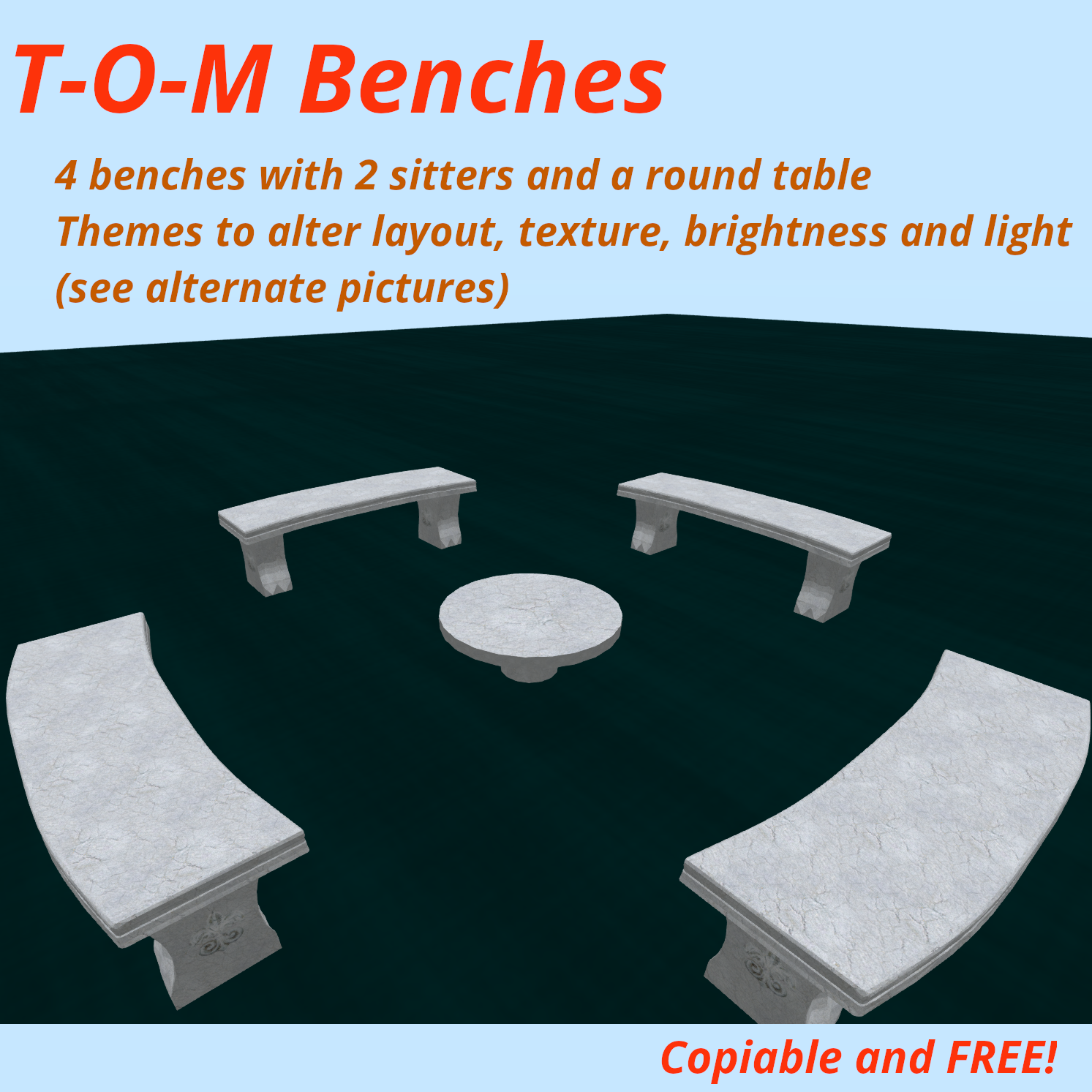
Today I finally took the time to put together a free object now available at Oggy's Scripted Items marketplace store: the T-O-M Benches.

As the name suggests, it is mainly a set of benches (4 of them) arranged around a simple table. Beyond the available single and couple poses on each bench, the main feature is a theme menu where you can select a few predefined appearance sets (called themes) and combine them to fit your taste :

  • texture: 7 choices
  • brightness: bright, dim or dark
  • layout: round, facing or rectangle
  • light: 6 colors + OFF (may require the "advanced lighting model" in your viewer).

Some of these combinations are particularly remarkable when setting the "sun position" to midnight, of course.

This object is completely free and also serves as a demonstration of the capabilities of the Theme-O-Matic, also available at Oggy's Scripted Items marketplace store and discussed in a previous article from this blog.

For more information (full manual, tutorial videos) about the Theme-O-Matic, please refer to its dedicated website.

Below you will find more screen captures that show several setup possibilities for the T-O-M Benches.


Wednesday, March 11, 2020

Multi crossfade

Long ago (damn, already 7 years!) I made a free fullperm script that would enable two prims to "cross fade", one fading in while the other fades out, in a repeated manner.

Recently someone asked for a special version of this script that would allow the same but for more prims. So here it is, the "Multi crossfade" allows the crossfading of any number of prims.

Still free and full perm, comments are inside the script about the available parameters: prim numbers, face number, sustain time, numer of fading steps and fading duration. A demo object is included in the package.

Now available at Oggy's Scripted Items marketplace store, free for commercial and commercial purposes but please no resell as is. Of course due credit and donations always appreciated.

Tuesday, September 12, 2017

ChainDance HUD

The ChainDance HUD is a device that attaches to your Head Up Display and lets you play animations in a "chained" way, meaning that you define for how long an animation (dance, pose, etc.) will play before switching to the next animation.

The order and duration of each animation is defined in a very simple notecard inside the HUD. This lets you create sequences very easily by editing a notecard such as this :
// comments begin with 2 slashes, they are ignored
// use comments to enhance readability if needed
BellyDance 1:20
boxing:30
Russian Dance:10.3
In this example, the "BellyDance 1" animation will play for 20 seconds, then "boxing" will play for 30 seconds, then "Russian Dance" for 10.3 seconds. After that, looping occurs and the HUD will play BellyDance again.

The only requirement is that the animations are placed inside the HUD's inventory along with the notecard (you cannot specify an animation by its UUID, unfortunately - SL limitation).

The ChainDance HUD automatically detects changes in inventory and reloads the configuration as required. To activate the sequence, just touch the HUD (and watch it spin!).

This applies only to the wearer of the HUD. If you need a device to animate several avatars, then you can have a look at the OAnim HUD !

The ChainDance HUD is completely free and available at Oggy's Scripted Items marketplace and in-world stores. Check it out!

Wednesday, December 23, 2015

Visitor Guide 1.1

Quick links: Visitor Guide, Free Visitor Guide DEMO

Are you a creator? Do you own an inworld store in Second Life®? Or maybe do you run exhibitions for your photos or your creations?

If so you may sometimes wish for a way to give information to your visitors or customers about what they are currently seeing. Indeed, visitors sometimes tend to "skip" to the next item because they lack information you could give them if only you were there all the time.

Real life museums have solved it by lending an "audio guide" to their visitors. With this device, visitors can press a button corresponding to an item and hear in their headphones some explanation. Sometimes this same information is available in several languages left for the visitor to choose.

Well the Visitor Guide is exactly that for Second Life®. By writing very simple straightforward configuration notecards, you can configure the Visitor Guide to provide the information you want.

You can have as many configuration notecards as you like, the end user will be able to freely select one. Text inside a configuration notecard gets an automatically numbered button in the menus (but you can override this auto numbering with an explicit label) and are automatically organized in pages of 10 buttons.

You can navigate through the menu pages with a "next" button of course, but you can also access a particular page directly for a "top menu" is created as necessary to hold indexes like 1-10, 11-20, etc.

More features include a special code \n to produce a newline in the text, [name] to use the visitor's display name, customizing the menu prompt and the "welcome message" (said when the user activates the configuration), and designating a particular configuration notecard as the "default" configuration (the one active right after the HUD starts).

The HUD itself is full perm, and the scripts only rely on the prim name (not link number) to know which button was clicked. This means you can freely retexture the HUD, and even remove a button or add another prim if you like. The main scripts are copyable and transferable, only a special script is non-transferable for specific reasons explained in the manual. The complete manual is available in English and in French.

7 different skins created by my talented artist friends are provided with the package (see pictures below), and you can of course create your own and use it.

The Visitor Guide is now available at Oggy's scripted items (marketplace store and inworld store). A free demo is available to quickly understand how your customers will see the HUD.

Of course, constructive comments are always welcome and requests considered. Feel free to contact me!

Saturday, August 22, 2015

WearPose 2.0, with unique pose adjustment feature

WearPose System 2.0
After quite a few weeks of development, I am proud to announce the availability of the WearPose System version 2.0, featuring an unique "pose adjustment" facility.

Like the previous versions, this system is aimed at creators and designed to animate an avatar from an attachment while taking care of the object position and orientation.

Compared to an object on which you would "sit" to start a pose or animation, you don't get a "sit target" to precisely position the animation itself with respect to the object.

However, this version 2.0 brings a specific and unique solution to this particular limitation that originates from  the way SL handles attachments : a secondary high-priority simple pose that aims at moving and turning the whole avatar.

Do not worry, you will not have to use an animation-creating program do to this as 50 such animation poses are provided with the product and you can create more from the WearPose System website itself very easily.

All the details are written in the creator manual, and the WearPose System is available from our marketplace store : here, not to forget the free demo here.

Share and enjoy!

Tuesday, April 21, 2015

OSI Inworld store now open !

In addition to our marketplace store, we are happy to announce the opening of the all-new OSI inworld store !

Teleport now and you will find there all OSI items, plus vendors for the WomBaby! products (Interactive Belly, Twins and supplements). Thanks to an ORezzer, you will be able to rez and witness some of our objects. Take the time to grab a freebies box too !


Monday, August 19, 2013

Simple Crossfade

Hi people...

I received a request for a script that would be able to crossfade two pictures. This means that when one is gradually fading in (appearing), the other gradually fades out (vanishes).

In SL it requires the use of two linked prims. This script is now available at Oggy's scripted items and, best of all, it's free and full perms. Feel free to use it and modify it for commercial or non commercial products, but do not resell it as is. Of course, due credit, good publicity and donations are appreciated :)

Available parameters concern every aspect of the process : from the identification of the two involved prims and their faces to the "sustain time" (the time during which each prim can be fully visible before fading out again) and the duration and smoothness of the crossfading process.

A demo object is also included.

If you like this script, please spread the word and rate it on the marketplace. Feel free to contact me by IM or email if you have any question or special request.

Monday, April 1, 2013

ShowHide-Multi update : groups!

Due to a customer request, I have made a minor update to the ShowHide-Multi script available (for free) at Oggy's Scripted Items.

The modification is just a check to allow the script to only react to hide or show commands when the person who sent it (either by touching the control message or by using private chat) has the same group tag active as the object.

Enjoy!

Wednesday, September 5, 2012

ShowHideFade script

My previous ShowHide and ShowHide-multi scripts have had quite a success as freebies, and someone asked me for a version which would fade in and out instead of brutally disappearing.

This new version, called ShowHideFade, is available in my marketplace store - for free. Please rate it and show your appreciation.

In summary, this script makes the object (the whole linkset) in which it is placed disappear or appear  when it "hears" a (customizable) command over a (customizable) private channel. Disappearing and appearing are done gradually, in a configurable way (number of steps and duration of each step) between two (configurable) min & max alpha values.

The delivery folder also includes a control pannel which emits the required order when touched. It is identical to the one shipping with the ShowHide script.

All scripts are full perms, and customization is achieved through a few global variables (documented in the script itself).

As always, remarks, questions, suggestions, constructive criticism and customization inquiries are welcome either by IM, notecard, comment on this blog or e-mail. Donations are appreciated.

Saturday, June 16, 2012

ORezzer 5.0

Here it is ! After months of work, I am happy to announce that the all new ORezzer 5.0 is now available at Oggy's Scripted Items.

As you may guess from the name, ORezzer is a new update to my rezzer, which was formerly known as Oggy's Rezzer. Read on for a summary of changes since the last release.

This object's job still is to rez things on demand, when someone selects the menu. It is designed to be very reliable (configuration notecard), customizable (more than 40 options) and extensible (through plugins).

To make a long story short, here are some feature highlights :
  • organization of objects under categories;
  • number of category & objects only limited by memory;
  • notecard-driven configuration to ensure reliability;
  • numerous options to configure every aspect of the rezzer;
  • a plugin system to extend the functionality of the rezzer without overloading the main scripts;
  • localizable (french translation included, please send me yours);
  • modifiable and copyable. The scripts are not modifiable.
A freely available PDF documentation covers every aspect of ORezzer. Please download and read it to make your mind :). And check the free demo rezzer too !

As a summary of changes (see below for the full changelog), let me mention :
  • many "under the hood" changes, leading to overall performance increase. The changes are incompatible with the previous communication scheme so you will have to update your plugins (see below). And rename your "configuration" as ".configuration" :). A full (easy) update procedure is described in the documentation.
  • New features that make adding new objects much simpler : just ask them to report their own names, coordinates and orientations thanks to the new OListener script! The old "Oggy's listener" is still compatible.
  • A new way to automatically compute the coordinates and update your configuration when you are moving your store to a new parcel (or just reorganizing the way the objects should be rezzed).
  • Global reorganization of the menus into a more logical and easy-to-understand hierarchy.
  • Many new  possibilities for plugins, including adding buttons either for the general user or the administrator only.
  • New options, fixes, changes, misc. features here and there...
  • New textures, new less megalomaniac name :)
ORezzer 5.0 is shipped with two plugins :
  • Auto Unrez 2.0 (formerly known as Timed Unrez) allows you to program automatic unrezzing of your objects when either a certain amount of time has elapsed or (new as v2.0) no one is detected around the rezzer in a determined range.
  • Sound Player 2.0 allows you to specify a default or specific sound that is played when an object is rezzed or unrezzed. Version 2.0 also adds an administrator button to temporarily mute and unmute sounds.
Other (separately available) plugin were also updated, as specified in the following table (click image to go to the relevant marketplace page and learn more).

Plugin & linkPriceMain featuresMain changes

RezzerSync 2.0
Free!
  • Synchronize multiple rezzers over the whole sim;
  • organize rezzers in "groups";
  • when one rezzes an object, others unrez theirs.
  • Updated the communication scheme for ORezzer 5.0;
  • Added the "RezzerGroup" administrator button.

Statistics 3.0
+Emailer 2.0
L$ 20
  • Collect and report statistics about rezzer usage;
  • send statistics reports by IM and/or email;
  • accept commands by private chat, email or administrator buttons;
  • cooperates with vendor plugin for sales statistics;
  • includes Emailer 2.0 for email functionalities and options.
  • Updated the communication scheme for ORezzer 5.0;
  • improved statistics text reports;
  • added 4 administrator buttons.

Vendor 3.0
+Emailer 2.0
L$ 100
  • Turn your rezzer into a vendor;
  • touch to rez an object, pay the rezzer to buy it;
  • configure sales: object, price, delivery box, announce;
  • notify sales by email;
  • options to fine tune the settings
  • cooperates with Statistics plugin
  • includes Emailer 2.0 for email functionalities and options.
  • Updated the communication scheme for ORezzer 5.0;
  • added a "sales list" button that lists available sales to the general user;
  • added options to support sales list.

Also available is ORezzer 5.0 vendor bundle, which includes :
  • ORezzer 5.0
  • Auto Unrez 2.0
  • Sound Player 2.0
  • Emailer 2.0
  • Statistics 3.0
  • Vendor 3.0.
Normal price: L$ 720. Bundled price: L$ 650.


The rezzer can be seen in live action at Katerina's Attic and Homes. Check out her nice houses !

If you ever need more features do not hesitate to contact me or to comment this post. I consider every request and will gladly implement any reasonable request in future versions or new plugins !

Here is the full changelog (dates may be inaccurate):

Version 5.0 (2012/4/30)
  • many simplifications in the script communication, breaking compatibility with older plugins. All plugins were be rewritten to use the new communication scheme.
  • Renamed "configuration" with ".configuration", "localization" with ".localization" and likewise for Instructions. This will help keep the main scripts/notecard at the top of the rezzer's inventory.
  • Replaced the "old" confighelper plugin with a standard ConfigHelper 5.0 script as integral part of the rezzer.
  • Renamed "Oggy's Rezzer" with the less megalomaniac "ORezzer". I'll tell my therapist about this. Same with the listener script.
  • Global reorganization of the menus, causing less clicks to take an action and more consistency. Plugin user menus and Plugin admin menus are now supported and there can be more than 9 of them as Admin and Extra menus are now fully multipage.
  • Removed options: menu_default, dialog_selectmode, mode_Categories, admin_plugins, dialog_pluginsadmin. They were no longer useful or meaningful.
  • Added options: dialog_extra, label_extra, reportcoords_timeout, admin_GlobOrient, admin_ReportCoords, admin_MovingMode.
  • Added a security delay of 2 seconds at the end of the configuration to allow plugins to add their last buttons.
  • Added a way for plugins to identify themselves and appear (name, version) in the about window.
  • Fixed a minor bug causing the wrong menu being served to a new toucher sometimes.
  • Used some unicode characters to embellish the menus.
  • Plugins are now aware of who is using the menu.
  • Version 4 of the OListener script no longer suicides if owner changes.
  • Reworked mini API from older versions. Broke compatibility with older versions, please let me know if this is a problem for you (a relay plugin can be done...), but I doubt anyone ever used the old API...
  • Added a mechanism so that all rezzer scripts make sure they all have the same version number, and that allows plugins to check their own compatibility.
  • Renamed a few options for consistency : mode_* (where *=Sequence, Random, About, Info, Unrez) all become extra_*. mode_Admin becomes label_Admin.
  • Added option dialog_timeout.
  • Fixed yet another (math) bug with moving mode which suggested a wrong value for rez_globalorientation in some cases.
  • Completely redone default texture.
  • Now picture_facenumber accepts a list of face numbers in addition to special values.
  • Changed the default for option picture_default to something nicer.
  • Updated french translation.
  • Made a demo version of Orezzer.

Version 4.1 (2012/3/10)
  • added option rez_globalorientation.
  • Improved reliability of the code checking for configuration consistency. Some optimizations.
  • Bug fix : several copies of the rezzer no longer share the same channel before resetting.
  • Version 3 of the listener script included, with provision for a config helper.
  • Plugins can now add a button into a dedicated submenu of the administrator menu. Supported by two new options admin_Plugins and dialog_pluginsadmin.
  • Configalyzer now strips chat headers (and timestamps) from the beginning of each configuration line, so as to support pasting configuration from local chat (useful for plugins who give hints about the configuration).
  • Bug fix : some options were not properly reset when resetting the rezzer.

Version 4.0 (2011/11/25) : final 4.0 relase, finally !
  • Updated the documentation, made a box for the plugins, lifted up the textures.

Version 4.0 beta 2 (2011/11/18)
  • Implemented plugins and their options.
  • Replaced the timed unrez script by a plugin version of the same script, taking a few options from the configuration.
  • Added safety measures so that a script never interprets one of its link_messages, thus effectively avoiding infinite loops. Some code optimizations.
  • Putting the rezzer to sleep or resetting it would not unrez previous objects. Fixed.
  • Added the Sound Player 1.0 plugin.
  • Updated and reorganized this documentation a bit. If no bug shows up, this will become the final 4.0 version.

Version 4.0 beta 1 (2011/11/11)
  • Major rewrite and reorganization in an attempt to dramatically reduce the memory consumption and thus the risk of running into stack/heap collision errors. The old script was replaced by three cooperating and specialized scripts, allowing heavier configurations and some modularity to support future enhancements as partial replacement scripts.
  • Other changes include the fact that the localization and configuration are now read simultaneously, while still taking precedence into account, so that options in the configuration always override those in the localization, who themselves override the default values.
  • Some bugs were squished too.

Version 3.2 (2011/5/14)
  • Implemented timed unrez thanks to a new script.
  • Documented the minimalistic link_message API.
  • Option rez_linkedrezzers now defaults to TRUE.

Version 3.1 (2011/4/21)
  • Implemented synchronization of multiple (linked) rezzers through option rez_linkedrezzers.
  • If the "Oggy's listener" script is found in the rezzers inventory, it is deactivated at initialization time. This prevents the rezzer from deleting itself when the sim restarts. New version of the listener script with one more check in this regard (no update required for old objects).

Version 3.0 (2011/2/27)
  • removed the 10 meter limitation and 3-second penalty when unrezzing objects. Both these changes required the replacement of the old "Oggy's pin setter" by a new "Oggy's listener". Please update your objects ! (Sorry for inconvenience).

Version 2.0 (2011/2/14)
  • Implemented compound objects.

Version 1.4 (2011/2/2)
  • Implemented option menu_default.
  • Replaced "rotation" by "orientation" in this documentation.

Version 1.3 (2011/1/30)
  • Implemented relative positions. Should help if someday you move your whole store to a new location.

Version 1.2 (2011/1/29)
  • Corrected a rather serious bug that caused the wrong avatar being listened to when selecting the menu, on some (rare) occasions.

Version 1.1 (2010/12/21)
  • Now the "instructions" admin button gives this instructions notecard and the Oggy's pin setter script, if it can be found in the inventory.

Version 1.0 (2010/12/05)
  • initial version.

Friday, April 13, 2012

Freebies to direct delivery

I just transfered my freebies from my magic box to the new direct delivery system now available on the marketplace. Currently this includes :
Please let me know if you encounter delivery problems.

All other (non free) items are still being delivered through my magic box. They will be migrated later.

The only difference you, the buyer, should notice is that items delivered through the Magic box arrive into your "Objects" folder, where as direct delivery puts items into the new "Received items" special folder.

Tuesday, October 18, 2011

Touch and Glow

Halloween is coming people ! Why not make some creeeeepy objects glow and play scary sounds ?

The following script is able to do just that. Adjust the parameters (written in bold in the script) to match your taste, put it into your prim and you're going !

Some explanations about settings are given as comments in the script, they should be quite easy to follow. If not, feel free to ask for more, either by commenting this post or by sending me an email : oggy.fink(at)gmail.com...


// Touch & Glow by Oggy Fink
// Use this script to make your prim glow when it's touched and play a
// (probably creepy) sound.
// See the parameters below.
// This script is free and full perm, but don't sell it as is. Using it
// into your creations (and selling them) is fine.

string sound="ee186da7-36c5-082a-f6ab-613cc33d3444";    // set this to the
    // name or UUID of the sound to play, or "" to disable sound
float volume=1.0;   // volume for the sound, between 0 (silent) and 1 (full
    // volume)
float maxglow=1.0;  // maximum amount of glow when active (between 0 and 1)

integer steps=25;   // number of steps for the glow. More means smoother and
    // longer transition
float stepdelay=0.1;    // time (in seconds) between each step. More means
    // longer.
float sustainglow=0.0;  // time to remain at full glow

// here are the face numbers that will receive the glow. You can add more but
// you will have to modify the rules (see below)
// you can also set one face to ALL_SIDES
integer facea=1;    // number of first face
integer faceb=3;    // number of second face
// could have used a list and a loop, but efficiency was the priority...

default {
    touch_start(integer total_number) {
        integer i;
        llPlaySound(sound,volume);
        for (i=1;i<=steps;i++) {
// modify the following line if you want to add or remove one face. Just copy
// the PRIM_GLOW,facenumber,i*maxglow/steps for each face
            llSetLinkPrimitiveParamsFast(LINK_SET,[PRIM_GLOW,facea,
                i*maxglow/steps,PRIM_GLOW,faceb,i*maxglow/steps]);
            llSleep(stepdelay);
        }
        if (sustainglow>0.0) llSleep(sustainglow);
        for (i=steps-1;i>=0;i--) {
// same modifications expected here
            llSetLinkPrimitiveParamsFast(LINK_SET,[PRIM_GLOW,facea,
                i*maxglow/steps,PRIM_GLOW,faceb,i*maxglow/steps]);
            llSleep(stepdelay);
        }
    }
}

The following simple script will help you determine a face number. Just put it into your prim and it will tell you which face is touched. Use the number in the Touch&Glow script to achieve exactly the desired effect. This script is called - trumpets, play ! - "Detectface" :)
// This script will tell which face was touched.

default {
    touch_start(integer total_number) {
        llSay(PUBLIC_CHANNEL,"Touched face #"+((string)llDetectedTouchFace(0)));
    }
}
All this is downloadable for free at my marketplace store. Comments, constructive criticism, (good) ratings and donations are welcome :)

Monday, September 19, 2011

ShowHide-Multi script

Since the recent release of the ShowHide script, some people have asked me for a way to make some prims of an object vanish, but not others.

Guess what ? Here it comes !

It's called ShowHide-Multi. The "Multi" part means that you can use several copies of the script in several prims of your object to make them disappear at the same time. The script is either controlled by chat over a private channel, or by link messages.

Private chat will work from a distance and may be issued directly by the viewer but can cause some server lag if many scripts are listening. Link messages, on the other hand, will cause less lag but will work only among the prims of a same object. Moreover, link messages require a helper script.

All is customizable, and a control script is available to emit either private chat or link messages. Please be sure to read the options available at the beginning of both scripts.

Again, i warn you against using this script on partially transparent prims, because the alpha setting of all faces of the prim will be overwritten by the vanishing manoeuvers :) (usual disclaimers apply).

Here is the ShowHide-Multi script to be placed in every prim that is to disappear.
// ShowHide-Multi script by Oggy Fink

// text to set above the root prim
string text="here";    // modify me, use "" for no text
vector color=<1.0,1.0,1.0>;    // color of the text

// modifiable parameters

integer channel = 8;    // channel number
string showcmd="SHOW";    // show command - use uppercase only
string hidecmd="HIDE";    // hide command - use uppercase only

integer listen_active=TRUE;	// should I listen to chat commands in addition to link messages?

// do not touch below

show() {
	llSetAlpha(1.0,ALL_SIDES);
	llSetText(text,color,1.0);
}

hide() {
	llSetAlpha(0.0,ALL_SIDES);
	llSetText("",color,1.0);
}

interpret(string message) {	// detects if it is a show or hide command and reacts
	string m=llToUpper(llStringTrim(message,STRING_TRIM));
	if (m==showcmd) {
		show();
	} else if (m==hidecmd) {
		hide();
	}
}

default {
	state_entry() {
		if (listen_active) llListen(channel,"",NULL_KEY,"");
		show();
	}

	link_message(integer sender_number, integer number, string message, key id) {
		if (number!=channel) { // the channel number acts as a key here
			return;
		}
		interpret(message);
	}
	
	listen(integer channel, string name, key id, string message) {
		interpret(message);
	}
}
Then the ShowHide-Multi control script :
// www.lsleditor.org  by Alphons van der Heijden (SL: Alphons Jano)
integer channel=8;    // channel number / link key

string showtext="Show !";
string hidetext="Hide !";
vector color=<1.0,0.5,0.0>;    // color for the floating text : . Use <1.0,1.0,1.0> for white

string showcmd="SHOW";
string hidecmd="HIDE";

// the following parameter sets if the command should be "said" (0), "whispered" (1), "shouted" (2), "regionsaid" (3) or sent as a link message (4)
integer emittype=0;	// edit accordingly


// do not modify below
integer visible=TRUE;

emit(string m) { // send a command
	if (emittype==0) {
		llSay(channel,m);
	} else if (emittype==1) {
		llWhisper(channel,m);
	} else if (emittype==2) {
		llShout(channel,m);
	} else if (emittype==3) {
		llRegionSay(channel,m);
	} else if (emittype==4) {
		llMessageLinked(LINK_SET,channel,m,NULL_KEY);
	}
}

default {
	state_entry() {
		llSetText(hidetext,color,1.0);
	}

	touch_start(integer total_number) {
		if (visible) {
			emit(hidecmd);
			visible=FALSE;
			llSetText(showtext,color,1.0);
		} else {
			emit(showcmd);
			visible=TRUE;
			llSetText(hidetext,color,1.0);
		}
	}
}
All this is downloadable for free at my marketplace store.

Saturday, August 27, 2011

ShowHide script

Here is a little script I quickly put together. Its job is to make an entire object (a whole link-set) disappear or appear upon "hearing" a command on a private channel. It also takes "care" of hiding and showing the text above the object (but see details below).

This script is very simple but proves useful for hiding simple things like pose balls. Do not use it however for things more complicated, like a house or a tent, because the mechanism the script uses to make the object disappear will alter the alpha (transparency) setting of all faces of all prims in the object, and will make them fully opaque again when reappearing.

If you plan to have this functionnality on objects with partial transparency on some faces, a way more subtle means to do this is required.

The channel number, as well as the SHOW and HIDE commands are customizable via easy parameters at the start of the script. Due to some limitation, the floating text, if any, to be set above the root prim has to be entered in the script too [Technical note : no apparent way of getting the text in a prim]. Currently the script is limitted to setting only the root prim's text (could be done in a different way but, well...). You can also set the color of said text in the parameters.

A second script (ShowHide control) is designed to be placed in an object (like a cube or a poster) to "toggle" the show and hide commands for objects in range that have the first script. That way, you can make all your poseballs appear or disappear at the same time by touching the control. Its parameters (channel and commands) should be the same as those of the ShowHide script.

One last useful tip : by setting the channel parameter to a negative number, you prevent avatars from issuing a direct command over the chat, and only the control script will be useable.

First, the ShowHide script :

// ShowHide script by Oggy Fink

// text to set above the root prim
string text="here";    // modify me, use "" for no text
vector color=<1.0,1.0,1.0>;    // color of the text

// modifiable parameters

integer channel = 8;    // channel number
string showcmd="SHOW";    // show command - use uppercase only
string hidecmd="HIDE";    // hide command - use uppercase only

// do not touch below

show() {
	llSetLinkAlpha(LINK_SET,1.0,ALL_SIDES);
	llSetText(text,color,1.0);
}

hide() {
	llSetLinkAlpha(LINK_SET,0.0,ALL_SIDES);
	llSetLinkPrimitiveParamsFast(LINK_SET,[PRIM_TEXT,"",color,0.0]);
}

default {
	state_entry() {
		llListen(channel,"",NULL_KEY,"");
	}

	listen(integer channel, string name, key id, string message) {
		string m=llToUpper(llStringTrim(message,STRING_TRIM));
		if (m==showcmd) {
			show();
		} else if (m==hidecmd) {
			hide();
		}
	}
}

Then the ShowHide control script :

// www.lsleditor.org  by Alphons van der Heijden (SL: Alphons Jano)
integer channel=8;    // channel number

string showtext="Show !";
string hidetext="Hide !";
vector color=<1.0,0.5,0.0>;    // color for the floating text : . Use <1.0,1.0,1.0> for white

string showcmd="SHOW";
string hidecmd="HIDE";


// do not modify below
integer visible=TRUE;

default {
	state_entry() {
		llSetText(showtext,color,1.0);
	}

	touch_start(integer total_number) {
		if (visible) {
			llSay(channel,hidecmd);
			visible=FALSE;
			llSetText(showtext,color,1.0);
		} else {
			llSay(channel,showcmd);
			visible=TRUE;
			llSetText(hidetext,color,1.0);
		}
	}
}

All this is downloadable for free at my marketplace store.